Navigating the academic landscape in 2026 requires more than just highlighters and heavy textbooks. With over 78% of Australian university students now integrating generative AI and digital productivity tools into their daily study routines (Risepoint, 2026), the browser has officially become the modern classroom. Whether you are tackling a complex engineering project at UNSW or a nursing placement in regional Victoria, your digital setup determines your pace.
The “dead time” spent between switching tabs, searching for lost citations, or fighting off the lure of a 3-hour TikTok rabbit hole can be reclaimed. By curating the right Chrome extensions, you can transform your browser from a distraction engine into a high-performance workstation.
Why Productivity Tools Matter in the Australian Context
The current cost-of-living crisis in Australia has placed unprecedented pressure on students to balance part-time work with full-time study. Recent data from Universities Australia (2026) indicates that student productivity isn’t just about grades; it’s about survival. Every hour saved through automation is an hour you can spend working or resting.
For many, the pressure becomes overwhelming. This is where professional academic support steps in. Many students choose to get online assignment help to bridge the gap between their research and the final submission, ensuring they meet rigorous Australian academic standards without burning out.
1. The “Must-Haves” for Research & Writing
Grammarly & QuillBot: The Dynamic Duo
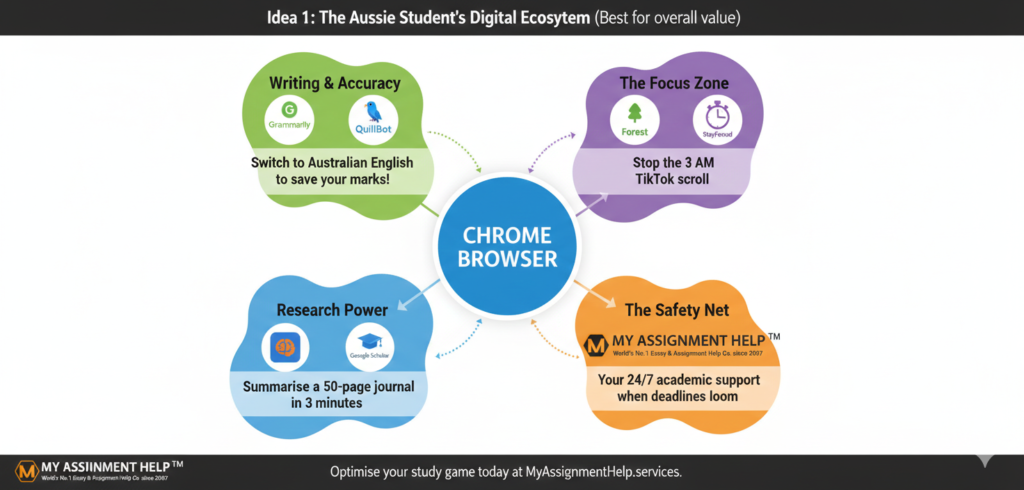
Grammarly remains the gold standard for Australian students, particularly for its ability to distinguish between American and Australian English (essential for avoiding those pesky ‘z’ vs ‘s’ spelling deductions). In 2026, its AI-driven tone detection helps ensure your emails to tutors are professional and your essays maintain a formal academic voice.
Scholarcy: The Paper Cruncher
If you’ve ever stared at a 50-page journal article at 11:00 PM, Scholarcy is your lifesaver. It summarizes research papers into “flashcards,” highlighting the key findings, limitations, and even extracting tables. According to user data, it can save students up to 70% of the time usually spent on literature reviews.
Cite This For Me / MyBib
Referencing is the bane of every student’s existence. Whether your faculty requires Harvard, APA 7, or AGLC (for the law students), these extensions allow you to generate a citation with one click.
2. Fighting the “Distraction Demon”
Forest: Gamified Focus
Forest is a cult favourite across Australian campuses. When you need to focus, you “plant a tree.” If you leave the tab to check social media, the tree withers. It’s a simple psychological hack that works wonders during the final weeks of the semester.
OneTab: For the “Tab Hoarders”
Researching a thesis usually results in 40+ open tabs, which kills your laptop’s RAM and your focus. OneTab collapses all your open tabs into a single list. When you need them again, you can restore them individually or all at once. It’s essential for maintaining a clean digital headspace.
3. Advanced Tools for High Achievers
Clockify: Time Tracking for Time Management
In 2026, “time-blocking” is the preferred method for the most successful students. Clockify allows you to track exactly how long you spend on different units. If you find you’re spending 10 hours on a 10% quiz and only 2 hours on a 40% essay, it’s time to re-evaluate.
Sometimes, despite having all the tools, the workload is simply mathematically impossible. In these instances, you can pay for assignments through reputable platforms to ensure your GPA doesn’t suffer when life gets in the way.
Key Takeaways for Aussie Students
- Automate the Mundane: Use citation and summary tools like Scholarcy and MyBib to handle the “busy work.”
- Regional Specifics: Always set your tools (like Grammarly) to English (AU) to stay aligned with local marking rubrics.
- Protect Your Focus: Use gamified apps like Forest to build better study habits.
- Know When to Ask for Help: Productivity tools are supplements, not replacements. Professional services provide a safety net for high-pressure periods.
FAQ: Frequently Asked Questions
Q: Are Chrome extensions safe to use for university portals?
A: Generally, yes. However, you should disable certain extensions like Grammarly when taking proctored online exams (like those on ProctorU) to avoid being flagged for academic misconduct.
Q: Does using these tools count as AI plagiarism?
A: Using tools for organization, citation, and grammar checking is standard practice. However, using generative AI to write your entire essay is where students run into trouble. Use tools to enhance your work, not replace it.
Q: Which extension is best for Australian-specific referencing?
A: MyBib is highly recommended as it has updated support for the Harvard-AGPS and AGLC styles commonly used in Australian universities.
About the Author
Lachlan Smith is a Senior Academic Consultant at MyAssignmentHelp. With over 8 years of experience in the Australian higher education sector, Lachlan specializes in helping students optimize their study workflows through digital transformation. He holds a Master of Education from the University of Sydney and is a frequent contributor to tech-in-ed blogs across the ANZ region.
References:
- Risepoint (2026). Voice of the Online Learner: Australia Edition.
- Universities Australia (2026). Action Needed to Secure Universities’ Future – Productivity Report.
- RMIT University (2025). Digital Inclusion Index: Surge in GenAI usage.